mirror of
https://github.com/wnlen/clash-for-linux.git
synced 2026-10-10 12:13:04 +08:00
 Arvin
Arvin
309 lines
8.1 KiB
Markdown
309 lines
8.1 KiB
Markdown
<h1 align="center">
|
||
🐧 Linux 一键安装 Clash</a>
|
||
<br>
|
||
</h1>
|
||
|
||
<h3 align="center">
|
||
一个面向 Linux 的 Clash(<a href="https://github.com/MetaCubeX/mihomo">Mihomo</a>)管理工具。
|
||
</h3>
|
||
|
||
<p align="center">
|
||
<img src="docs/assets/5.png" width="100%">
|
||
</p>
|
||
|
||
# ✨ 核心特性
|
||
|
||
- 🚀 **自动识别系统架构**,自动下载并使用对应 Clash 内核
|
||
- 🧪 **端口自动检测与分配**,避免冲突
|
||
- 🔄 **多订阅管理(clashctl)**,支持自动订阅切换
|
||
- 🧠 **Mixin 机制**,可按需追加/覆盖 Clash 配置
|
||
- 🌐 **Tun 模式支持**(需 Clash Meta / Premium)
|
||
- 🔐 **安全默认配置**,自动生成或自定义 Secret
|
||
- 🩺 **内置诊断工具(`doctor`)**,快速排障
|
||
|
||
### 适用场景
|
||
|
||
- Linux 云服务器(VPS)
|
||
- 家用 NAS / 小主机(x86 / ARM)
|
||
- 需要稳定访问 GitHub、Go / Node / Docker 生态的开发环境
|
||
- 不希望长期手动维护 Clash 运行状态的用户
|
||
|
||
# 🚀 一键安装(推荐)
|
||
|
||
在终端中执行以下命令即可完成安装:
|
||
|
||
```
|
||
git clone --branch master --depth 1 https://ghfast.top/https://github.com/wnlen/clash-for-linux.git
|
||
cd clash-for-linux
|
||
bash install.sh
|
||
```
|
||
|
||
- 上述命令使用了[加速前缀](https://gh-proxy.org/),如失效可更换其他[可用链接](https://ghproxy.link/)。
|
||
- 可通过 `.env` 文件或脚本参数自定义安装选项。
|
||
|
||
------
|
||
|
||
## ⌨️ 命令一览
|
||
|
||
```bash
|
||
用法:
|
||
clashctl 命令 [选项]
|
||
|
||
指令:
|
||
on 开启代理
|
||
off 关闭代理
|
||
start 启动 Clash
|
||
stop 停止 Clash
|
||
restart 重启并自动应用当前配置
|
||
status 查看当前状态
|
||
update 更新到最新版本并自动应用配置
|
||
mode 查看当前运行模式(systemd/script/none)
|
||
ui 输出 Dashboard 地址
|
||
secret 输出当前 secret
|
||
doctor 健康检查
|
||
logs [-f] [-n 100] 查看日志
|
||
sub show|update 查看订阅地址 / 输入或更新订阅并立即生效
|
||
tun status|on|off 查看/启用/关闭 Tun
|
||
mixin status|on|off 查看/启用/关闭 Mixin
|
||
|
||
选项:
|
||
-h, --help 显示帮助信息
|
||
```
|
||
|
||
------
|
||
|
||
## 🌐 Web 控制台
|
||
|
||
```bash
|
||
$ clashui
|
||
╔═══════════════════════════════════════════════╗
|
||
║ 😼 Web 控制台 ║
|
||
║═══════════════════════════════════════════════║
|
||
║ ║
|
||
║ 🔓 注意放行端口:9090 ║
|
||
║ 🏠 内网:http://192.168.0.1:9090/ui ║
|
||
║ 🌏 公网:http://8.8.8.8:9090/ui ║
|
||
║ ☁️ 公共:http://board.zash.run.place ║
|
||
║ ║
|
||
╚═══════════════════════════════════════════════╝
|
||
|
||
$ clashctl secret mysecret
|
||
😼 密钥更新成功,已重启生效
|
||
|
||
$ clashctl secret
|
||
😼 当前密钥:mysecret
|
||
```
|
||
|
||
- 可通过浏览器打开 `Web` 控制台进行可视化操作,例如切换节点、查看日志等。
|
||
- 默认使用 [zashboard](https://github.com/Zephyruso/zashboard) 作为控制台前端,如需更换可自行配置。
|
||
- 若需将控制台暴露到公网,建议定期更换访问密钥,或通过 `SSH` 端口转发方式进行安全访问。
|
||
|
||
|
||
------
|
||
|
||
## 🧰 常用管理命令
|
||
|
||
统一管理入口(推荐使用):
|
||
|
||
```
|
||
clashctl status
|
||
clashctl start
|
||
clashctl restart
|
||
clashctl update
|
||
clashctl set-url "https://example.com/your-subscribe"
|
||
```
|
||
|
||
### 多订阅管理
|
||
|
||
```
|
||
clashctl sub add office "https://example.com/office"
|
||
clashctl sub add personal "https://example.com/personal"
|
||
clashctl sub list
|
||
clashctl sub use personal
|
||
clashctl sub update
|
||
clashctl sub log
|
||
```
|
||
|
||
------
|
||
|
||
## 🏗️ 架构设计
|
||
|
||
```text
|
||
.env / 订阅
|
||
↓
|
||
generate(配置生成)
|
||
↓
|
||
runtime/config.yaml(运行态)
|
||
↓
|
||
Clash 内核运行(systemd / script)
|
||
↓
|
||
status / doctor(状态观测)
|
||
```
|
||
|
||
核心原则:
|
||
|
||
- 配置生成 ≠ 运行
|
||
- 运行环境隔离
|
||
- 状态必须可观测
|
||
|
||
------
|
||
|
||
## 🔄 配置修改与更新
|
||
|
||
### 修改 Clash 配置并重启
|
||
|
||
```
|
||
vim runtime/config.yaml
|
||
clashctl restart
|
||
```
|
||
|
||
> `restart` 不会更新订阅
|
||
|
||
### 更新订阅
|
||
|
||
```
|
||
clashctl update
|
||
```
|
||
|
||
或指定订阅:
|
||
|
||
```
|
||
clashctl sub update personal
|
||
```
|
||
|
||
------
|
||
|
||
## 🧩 Mixin 配置(可选)
|
||
|
||
用于追加或覆盖 Clash 配置。
|
||
|
||
- 默认读取:`config/mixin.d/*.yaml`(按文件名排序)
|
||
- 也可在 `.env` 中指定:
|
||
|
||
```
|
||
export CLASH_MIXIN_DIR='config/mixin.d'
|
||
export CLASH_MIXIN_PATHS='config/mixin.d/base.yaml,config/mixin.d/rules.yaml'
|
||
```
|
||
|
||
------
|
||
|
||
## 🌐 Tun 模式(可选)
|
||
|
||
需 Clash Meta / Premium 支持,在 `.env` 中配置:
|
||
|
||
```
|
||
export CLASH_TUN_ENABLE=true
|
||
export CLASH_TUN_STACK=system
|
||
export CLASH_TUN_AUTO_ROUTE=true
|
||
export CLASH_TUN_AUTO_REDIRECT=false
|
||
export CLASH_TUN_STRICT_ROUTE=false
|
||
export CLASH_TUN_DNS_HIJACK='any:53'
|
||
```
|
||
|
||
------
|
||
|
||
## ⛔ 停止服务
|
||
|
||
```
|
||
clashctl stop
|
||
proxy_off
|
||
```
|
||
|
||
------
|
||
|
||
## 🧹 卸载
|
||
|
||
```
|
||
bash uninstall.sh
|
||
```
|
||
|
||
|
||
|
||
## subconverter 多架构支持
|
||
|
||
`subconverter` 用于将订阅内容转换为标准 clash 配置。默认会尝试以下位置:
|
||
|
||
- `tools/subconverter/subconverter`
|
||
- `tools/subconverter/subconverter-<arch>`
|
||
- `tools/subconverter/bin/subconverter-<arch>`
|
||
|
||
其中 `<arch>` 取值为:
|
||
|
||
- `linux-amd64`
|
||
- `linux-arm64`
|
||
- `linux-armv7`
|
||
|
||
自动下载默认使用 `https://github.com/tindy2013/subconverter/releases/latest/download/subconverter_{arch}.tar.gz`,
|
||
如果需要自定义来源或关闭下载,可以设置:
|
||
|
||
- `SUBCONVERTER_PATH`:指定自定义 `subconverter` 可执行文件路径。
|
||
- `SUBCONVERTER_AUTO_DOWNLOAD=false`:关闭自动下载(默认会尝试自动下载,需 `curl`/`wget`)。
|
||
- `SUBCONVERTER_DOWNLOAD_URL_TEMPLATE`:下载模板,使用 `{arch}` 占位符,如:
|
||
|
||
```bash
|
||
export SUBCONVERTER_AUTO_DOWNLOAD=true
|
||
export SUBCONVERTER_DOWNLOAD_URL_TEMPLATE='https://example.com/subconverter_{arch}.tar.gz'
|
||
```
|
||
|
||
当 `subconverter` 不可用时会自动跳过转换,并提示警告。
|
||
|
||
<br>
|
||
|
||
## 设置代理
|
||
1. 开启 IP 转发
|
||
|
||
```bash
|
||
echo "net.ipv4.ip_forward = 1" | tee -a /etc/sysctl.conf
|
||
sysctl -p
|
||
```
|
||
|
||
2.配置iptables
|
||
```bash
|
||
# 先清空旧规则
|
||
iptables -t nat -F
|
||
|
||
# 允许本机访问代理端口
|
||
iptables -t nat -A OUTPUT -p tcp --dport 7890 -j RETURN
|
||
iptables -t nat -A OUTPUT -p tcp --dport 7891 -j RETURN
|
||
iptables -t nat -A OUTPUT -p tcp --dport 7892 -j RETURN
|
||
|
||
# 让所有 TCP 流量通过 7892 代理
|
||
iptables -t nat -A PREROUTING -p tcp -j REDIRECT --to-ports 7892
|
||
|
||
# 保存规则
|
||
iptables-save | tee /etc/iptables.rules
|
||
```
|
||
|
||
3. 让 iptables 规则开机生效
|
||
在 `/etc/rc.local`(或 `/etc/rc.d/rc.local`)加上:
|
||
|
||
```bash
|
||
#!/bin/bash
|
||
iptables-restore < /etc/iptables.rules
|
||
exit 0
|
||
```
|
||
|
||
```bash
|
||
chmod +x /etc/rc.local
|
||
```
|
||
|
||
## 🔗 引用
|
||
|
||
- [clash](https://clash.wiki/)
|
||
- [mihomo](https://github.com/MetaCubeX/mihomo)
|
||
- [subconverter](https://github.com/tindy2013/subconverter)
|
||
- [zashboard](https://github.com/Zephyruso/zashboard)
|
||
|
||
# 常见问题
|
||
|
||
1. 部分Linux系统默认的 shell `/bin/sh` 被更改为 `dash`,运行脚本会出现报错(报错内容一般会有 `-en [ OK ]`)。建议使用 `bash xxx.sh` 运行脚本。
|
||
|
||
2. 部分用户在UI界面找不到代理节点,基本上是因为厂商提供的clash配置文件是经过base64编码的,且配置文件格式不符合clash配置标准。
|
||
|
||
目前此项目已集成自动识别和转换clash配置文件的功能。如果依然无法使用,则需要通过自建或者第三方平台(不推荐,有泄露风险)对订阅地址转换。
|
||
|
||
3. 程序日志中出现`error: unsupported rule type RULE-SET`报错,解决方法查看官方[WIKI](https://github.com/Dreamacro/clash/wiki/FAQ#error-unsupported-rule-type-rule-set)
|
||
## ⭐ Star History
|
||
|
||
[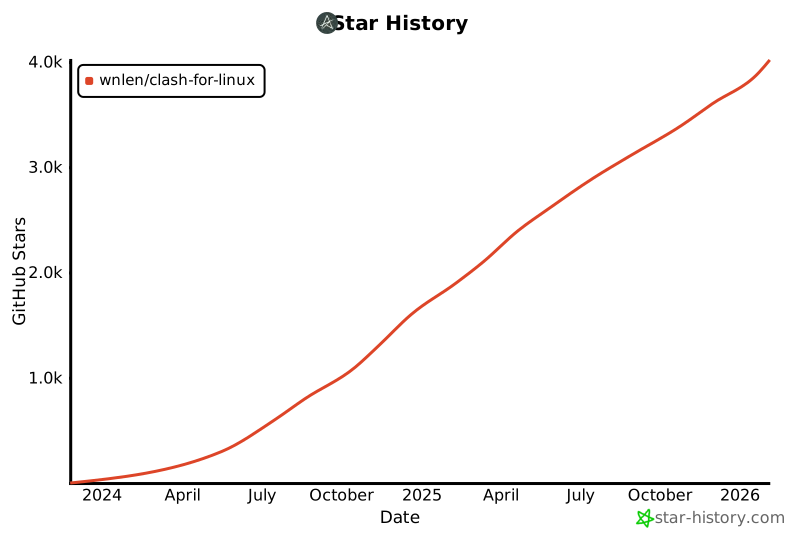](https://star-history.com/#wnlen/clash-for-linux&Date)
|